From single agents to orchestrated teams — the architecture patterns behind AI that acts, and how to choose between them without over-engineering.
6 concepts 4 decision paths Calculator
Share
The patterns
Click each pattern to see the architecture and business context.
The building block
Single Agent
"One employee with clear instructions and access to tools"
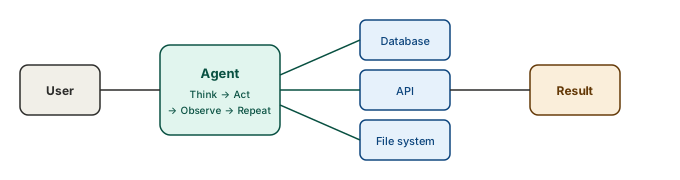
A single agent receives a goal, breaks it into steps, and uses tools to accomplish them — one action at a time. It reads data, calls APIs, writes files, and checks its own work. The key difference from a chatbot: it doesn't just answer questions, it takes actions. It has a loop: think, act, observe, repeat.
Start here. Most agent use cases don't need multi-agent orchestration. A single well-prompted agent with the right tools handles 80% of automation tasks. Over-engineering with multiple agents when one would do is the most common mistake in agentic AI.
The building block
Single Agent
"One employee with clear instructions and access to tools"
A single agent receives a goal, breaks it into steps, and uses tools to accomplish them — one action at a time. It reads data, calls APIs, writes files, and checks its own work. The key difference from a chatbot: it doesn't just answer questions, it takes actions. It has a loop: think, act, observe, repeat.
Start here. Most agent use cases don't need multi-agent orchestration. A single well-prompted agent with the right tools handles 80% of automation tasks. Over-engineering with multiple agents when one would do is the most common mistake in agentic AI.
The team
Multi-Agent Orchestration
"A project manager delegating to specialists"
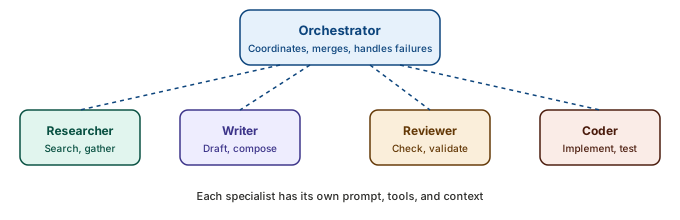
An orchestrator agent receives the goal and delegates sub-tasks to specialist agents — a researcher, a writer, a reviewer, a coder. Each specialist has its own system prompt, tools, and context window. The orchestrator coordinates, merges results, and handles failures. Like a real team: the manager doesn't do the work, they make sure the right people do.
Use multi-agent when the task genuinely requires different expertise or when context windows aren't large enough for a single agent. The coordination cost is real — message passing, error handling, state management. Don't split into agents what one agent can handle sequentially.
The safety net
Human-in-the-Loop
"A junior employee who escalates to their manager for big decisions"
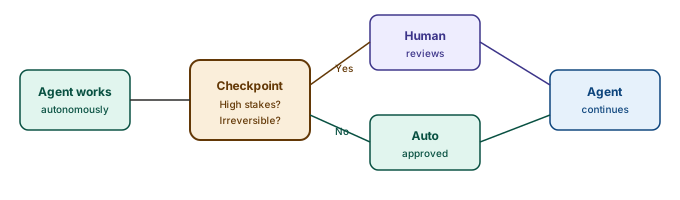
The agent works autonomously for routine tasks but pauses at defined checkpoints: before sending an email, before executing a payment, before deleting data. A human reviews, approves or rejects, and the agent continues. The boundaries are explicit: below this threshold, act freely; above it, ask.
This isn't a limitation — it's a feature. The highest-value agent deployments all have human checkpoints for irreversible or high-stakes actions. The goal isn't full autonomy; it's appropriate autonomy. Start with tight guardrails and widen them as trust builds.
The oversight layer
Human-on-the-Loop
"A factory supervisor watching the production line from the control room"
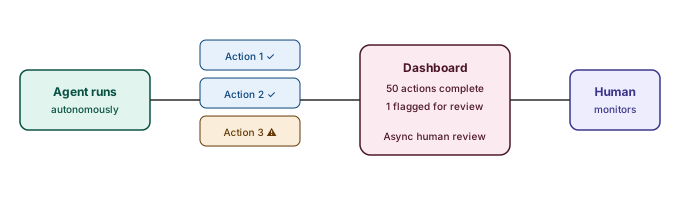
Unlike human-in-the-loop (where the agent pauses and waits for approval), human-on-the-loop means the agent acts autonomously while a human monitors the output. The human can intervene, correct, or shut things down — but they don't block each action. Think of it as supervision rather than co-signing. The agent sends periodic summaries, flags anomalies, and the human reviews asynchronously.
This is where mature agent deployments land. You start with human-in-the-loop (tight guardrails), measure error rates, and gradually shift to human-on-the-loop as confidence builds. The economics are better: the human reviews a dashboard of 50 completed actions rather than approving each one individually. Reserve in-the-loop for truly irreversible actions.
Universal connectivity
Tool Use via MCP
"USB-C for AI agents — connect once, use everything"
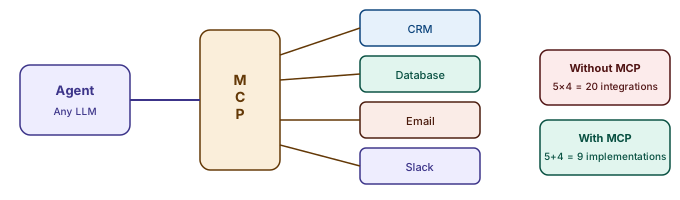
An agent without tools is just a chatbot. Tools let agents read databases, call APIs, search the web, write files, and interact with any system. MCP (Model Context Protocol) standardises this: instead of building a custom integration for every tool, you expose tools via a single protocol. Any MCP-compatible agent can use any MCP-compatible tool.
MCP eliminates the N×M integration problem. Without it, 5 agents × 4 tools = 20 custom integrations. With MCP, it's 5 + 4 = 9 implementations. The protocol is the multiplier that makes agentic AI practical at enterprise scale.
Revenue recovery agent
Revenue Recovery Agent
"An accounts receivable clerk who never sleeps"
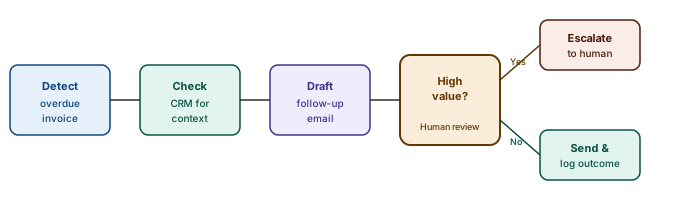
Here's a concrete example that ties all the patterns together. A revenue recovery agent monitors overdue invoices, checks the CRM for context (are they a key account? is there a dispute?), drafts an appropriate follow-up email, escalates to a human for high-value accounts, and logs every action. It runs on a schedule, handles edge cases, and gets better with feedback.
This single agent combines: tool use (CRM, email, database), human-in-the-loop (escalation for high-value accounts), and a clear success metric (recovered revenue). It's not a demo — it's a pattern that applies to any process where humans currently chase status and send follow-ups.
What is an AI agent, and how is it different from a chatbot?
An agent receives a goal, breaks it into steps, and uses tools to accomplish them — reading data, calling APIs, writing files, checking its own work. It runs a loop: think, act, observe, repeat. A chatbot answers questions; an agent takes actions. That single difference is what makes agents valuable and what makes them a governance problem, because the actions are real and some of them cannot be undone.
When should I use multi-agent orchestration instead of a single agent?
Later than you think. A single well-prompted agent with the right tools handles the large majority of automation tasks, and over-engineering with multiple agents when one would do is the most common mistake in agentic AI. Split the work only when the task genuinely needs different expertise, or when one context window cannot hold it. Coordination is not free — message passing, error handling, and state management are all real costs.
What is the difference between human-in-the-loop and human-on-the-loop?
In-the-loop means the agent pauses and waits for approval before a defined action — sending the email, making the payment, deleting the data. On-the-loop means the agent acts autonomously while a human supervises the output and can intervene or shut it down. In-the-loop is co-signing; on-the-loop is supervision. Mature deployments start in-the-loop, measure the error rate, and shift to on-the-loop as confidence builds, reserving co-signing for genuinely irreversible actions.
How do I know whether a task is a good fit for an agent?
Two tests. First, is the task well-defined with a clear definition of done? Vague goals like "improve the report" produce loops and wasted tokens — write the pass/fail criteria before you build anything. Second, can a failure be safely reversed? If not, put a human checkpoint in front of the irreversible step. Start with read-only agents and widen the permissions as the error rate earns it.
How do agents connect to the systems they need to act on?
Through tools, and at any scale that means a standard protocol rather than bespoke connectors. An agent without tools is just a chatbot. MCP lets you expose each system once and have any compliant agent use it, which turns five agents across four tools from twenty custom integrations into nine implementations. That ratio is the difference between a demo and something you can run across an enterprise.
How do I justify the cost of building an agent?
Multiply time saved per task by frequency, and compare it to build plus maintenance. An agent that saves ten minutes once a month is not worth building. An agent that saves two minutes two hundred times a day is transformative. The maths is unglamorous and it kills most agent proposals before they consume a quarter — which is exactly what it is for.